TaxRoutine › Direct Tax › TDS › Form 141 › Schedule B
Free Guide
Step-by-Step
IT Act 2025
How to File Form 141 — Schedule B
TDS on Purchase of Immovable Property
A complete walkthrough of the e-Pay Tax flow for buyers deducting TDS under Section 393(1) [Table Sl. No. 3(i)] on property purchases of ₹50 lakh or more.
✍️ Ruban Jayakumar S V
📅 Tax Year 2026-27 onwards
⏱ 8 min read
🔄 Rules 218 & 219, IT Rules 2026
⚠️
Where to find this form
Form 141 is not available under e-File → Income Tax Forms, and it is not accessible on the pre-login screen like regular challans. You must be logged in to your e-filing account and access it through e-File → e-Pay Tax. This trips up most first-time filers.
Before starting, make sure you have the following ready:
| What You Need | Details |
|---|
| PAN of the buyer | Your own PAN — used for login and auto-population of deductor details. MANDATORY |
| PAN of the seller(s) | Every seller’s PAN must be available. Invalid PAN means credit won’t reach the seller and you face higher TDS liability. MANDATORY |
| Property details | Complete address of the property being transferred, type (land or building), date of agreement, date of registration if available. |
| Sale consideration | The agreed sale price and the stamp duty value — both required. TDS is deducted on the higher of the two. |
| Co-buyer details (if any) | PAN, name, contact, and proportion of co-buyers if the property is being purchased jointly. |
| Net banking / UPI | Payment is made simultaneously during filing. Keep your payment method ready. |
| Previous ARN (for instalments) | If this is a subsequent or last instalment, the acknowledgement number of the first Form 141 filing is required. AUTO-DISABLED for first instalment |
1
Log in to the Income Tax e-Filing Portal
Go to
incometax.gov.in and log in using your PAN and password. Ensure you are logging in as the
buyer (deductor) — the person responsible for deducting TDS.
🔐
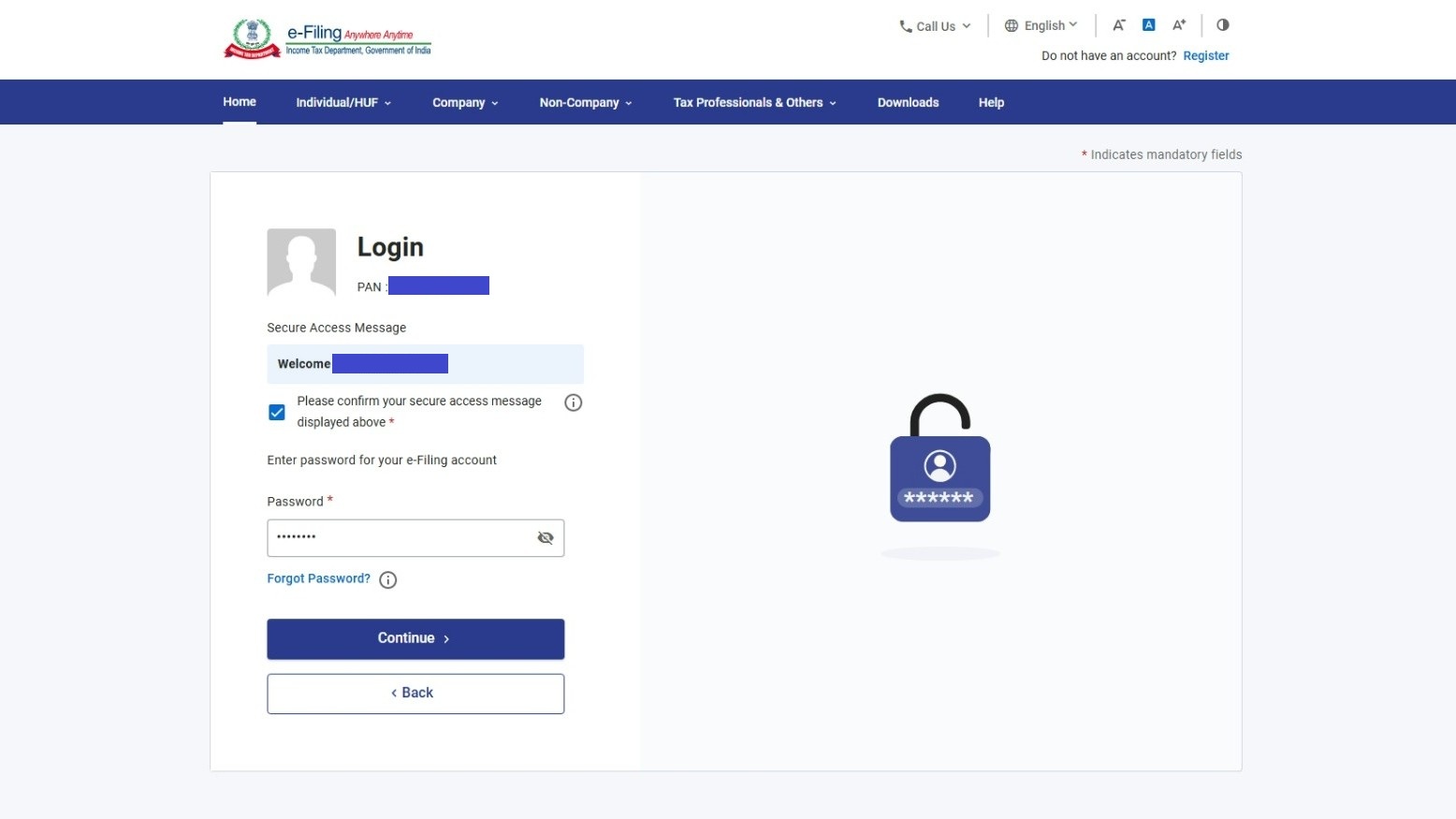
Income Tax Portal Login Screen
Log in using your PAN as User ID
2
Go to e-File → e-Pay Tax
From the dashboard, click on e-File in the top navigation, then select e-Pay Tax from the dropdown. This is the only route to access Form 141.
incometax.gov.in/iec/foportal/
📂
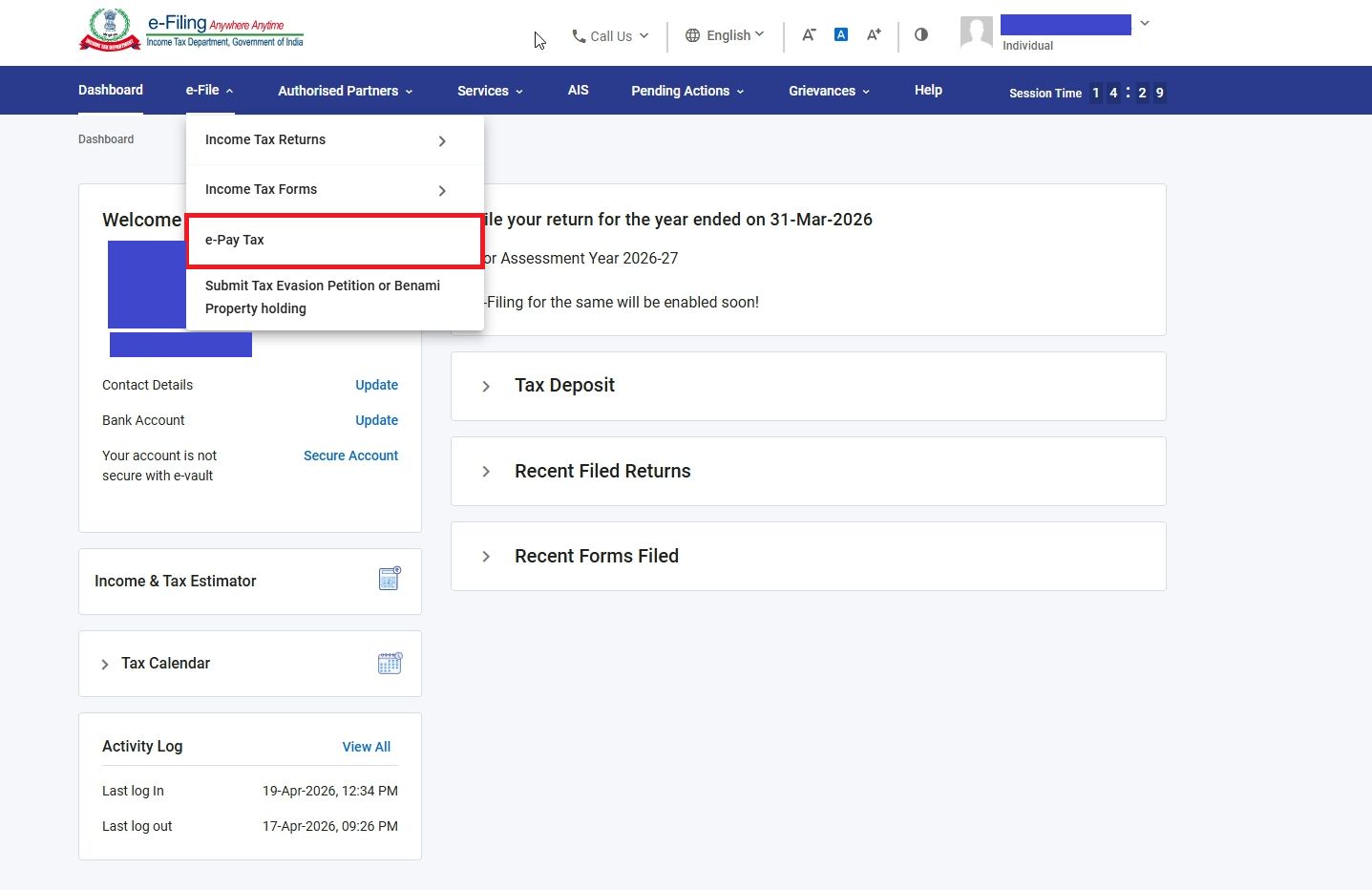
e-File dropdown with e-Pay Tax highlighted
e-File → e-Pay Tax — the only access route for Form 141
3
Select the Income-tax Act, 2025 Option
On the e-Pay Tax screen, you will see multiple Act options. Select “Income-tax Act, 2025 [For Tax Year 2026-27 and onwards (including Advance Tax for TY 2026-27)]”. This is the correct option for Form 141 filings from Tax Year 2026-27 onwards.
incometax.gov.in — e-Pay Tax
📋
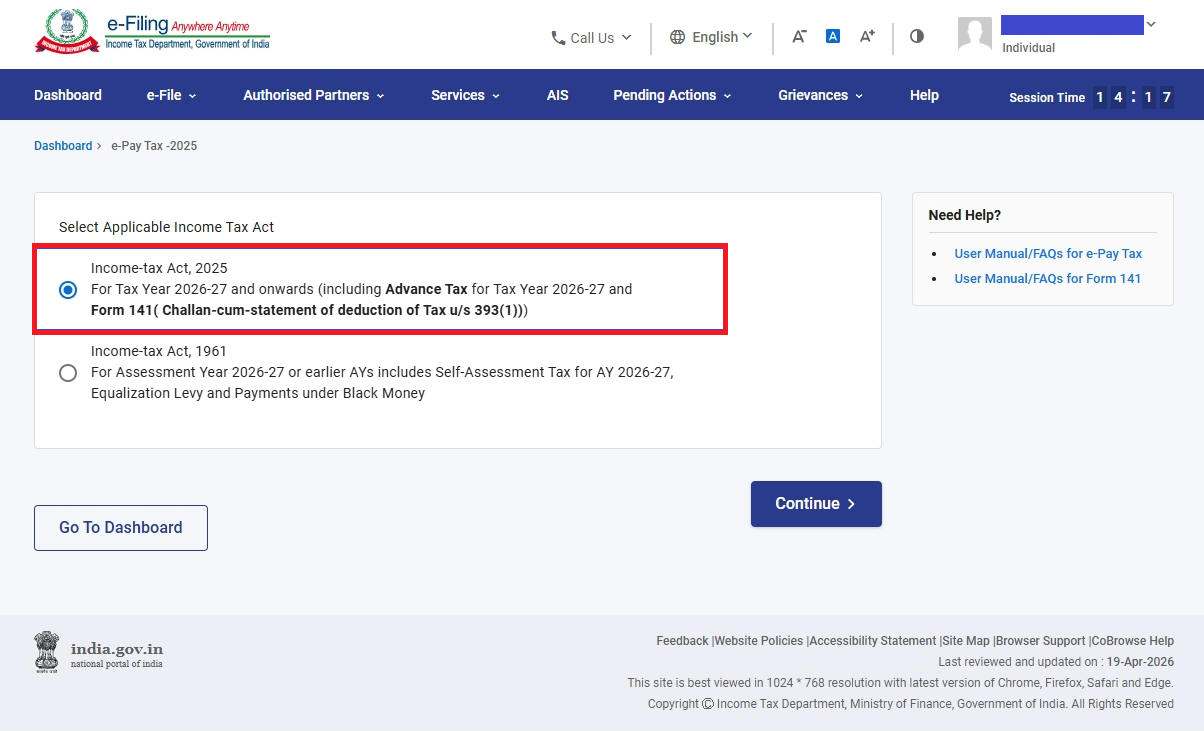
Act selection screen — Income-tax Act 2025 highlighted
Select “Income-tax Act, 2025” for Tax Year 2026-27 filings
4
Click “+ New Payment” and Select Form 141
On the next screen, click the + New Payment button in the top right. A list of payment options will appear. Select Form 141 (Challan-cum-statement of deduction of tax under section 393(1)).
🚫
Do not confuse these two options
There are two Form 141 entries in the list. Do NOT select “Form 141 (Demand Payment for Challan-cum-statement…)” — that is only for paying defaults on previously processed statements. Select the plain “Form 141 (Challan-cum-statement…)” for fresh filings.
incometax.gov.in — New Payment
➕
New Payment options list — Form 141 options visible
Click + New Payment and select Form 141 (Challan-cum-statement) — not the Demand Payment variant
5
Select Corporate or Non-Corporate Deductee
A popup will appear asking whether the deductee (seller) is a Corporate or Non-Corporate entity. Select the appropriate option based on the seller’s status.
💡
How to identify corporate vs non-corporate
Look at the 4th letter of the seller’s PAN. If it is “C”, the seller is a company (corporate). Any other letter — P (individual), H (HUF), F (firm), etc. — is non-corporate. If you have multiple sellers with mixed statuses, you will need to file separate Form 141s — one for corporate sellers and one for non-corporate sellers.
incometax.gov.in — Form 141
🏢
[SCREENSHOT: form141b-step5-corporate-popup.jpg]
Corporate / Non-Corporate selection popup
Select based on the 4th character of the seller’s PAN — “C” = Corporate, others = Non-Corporate
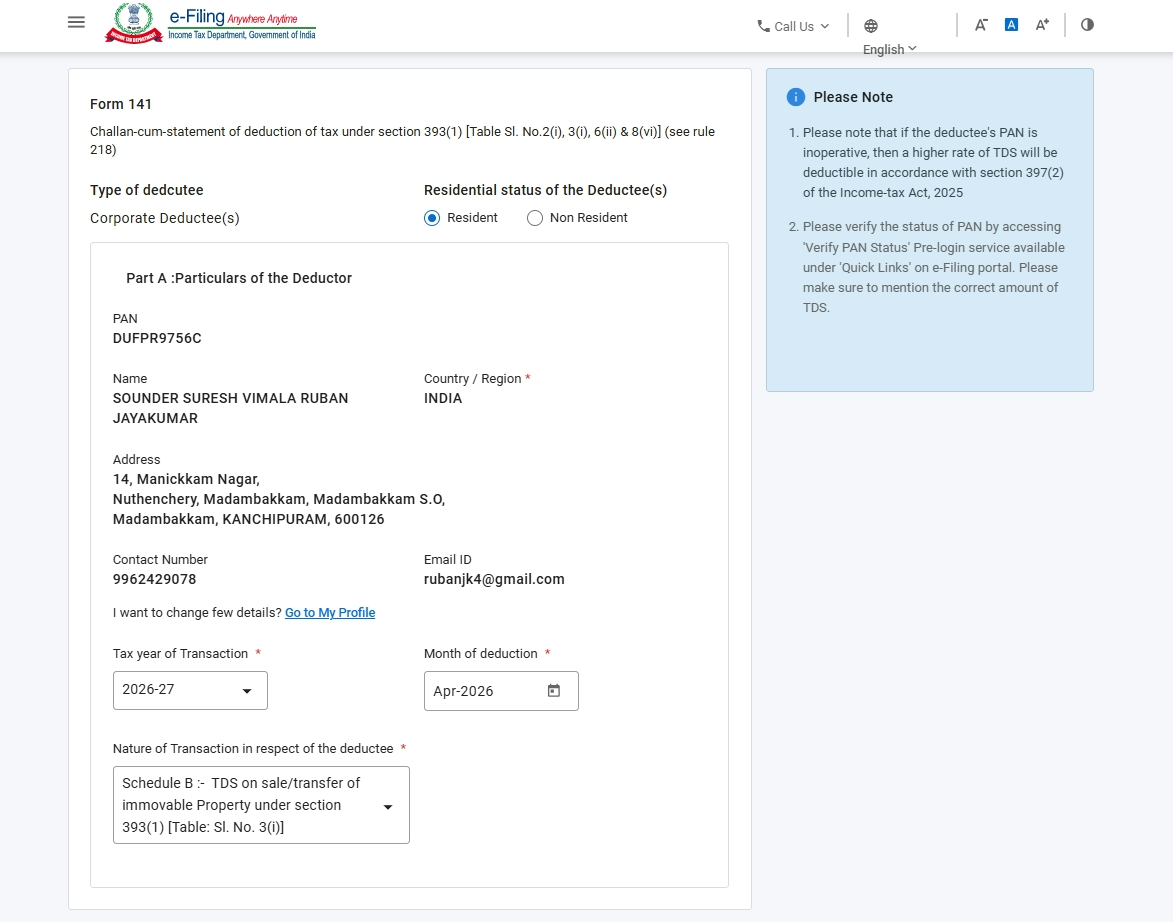
The next screen shows the Particulars of the Deductor (i.e., the buyer’s details). Most fields are auto-populated from your registered portal profile. You only need to fill in the fields that are not pre-filled.
| Field | Source / Action Required |
|---|
| Residential Status | Select from dropdown — Resident or Non-Resident. SELECT |
| PAN | Auto-populated from your login. AUTO |
| Name | Auto-populated from your PAN profile. AUTO |
| Address | Auto-populated from your registered profile. AUTO |
| Contact Number | Auto-populated. Verify it is current. AUTO |
| Email ID | Auto-populated. Verify it is current. AUTO |
| Tax Year | Select from dropdown (e.g., 2026-27). SELECT |
| Month of Deduction | Select the month in which TDS was deducted. SELECT |
| Nature of Transaction | Select Schedule B — Transfer of Immovable Property and click Continue. SELECT |
incometax.gov.in — Form 141 Deductor Details
👤
[SCREENSHOT: form141b-step6-deductor-details.jpg]
Deductor details screen — auto-populated fields + Schedule B selected
Most deductor fields are auto-populated. Select Tax Year, Month of Deduction, and Nature of Transaction (Schedule B)
After clicking Continue on the deductor screen, you land on the Schedule B transaction details page. This is where the property-specific information is entered.
A
Property Details
| Field | What to Enter |
|---|
| Type of Property | Select: Land or Building or part of a building. Agricultural land is excluded from this provision. SELECT |
| Address of Property | Full address of the property being transferred — country/region, flat/door number, road/street, PIN, area/locality, district, state. MANDATORY |
| Date of Agreement | Date the sale agreement was executed (dd/mm/yyyy). MANDATORY |
| Date of Registration | Date of registration with the sub-registrar, if the registration has already taken place. Leave blank if not yet registered. IF AVAILABLE |
| Total Stamp Duty Value | The circle rate / stamp duty value of the property as assessed by the authority. MANDATORY |
| Total Sale Consideration | The actual agreed sale price. TDS is computed on the higher of stamp duty value or actual consideration. MANDATORY |
B
Lumpsum or Instalments?
Select whether the payment is being made in lumpsum or instalments. If in instalments, you must further specify whether this is the first, a subsequent, or the last instalment.
First Instalment
Initial payment
No previous ARN needed. The “Previous Acknowledgement Number” field is disabled. File this form and retain the ARN generated for future instalments.
Subsequent Instalment
Middle payments
Enter the Previous Acknowledgement Number (ARN) from the first Form 141 filing. This links all instalments to the same transaction.
Last Instalment
Final payment
Enter the Previous ARN and the total consideration paid/credited including this instalment — the cumulative total across all instalments.
📎
Save your ARN after every instalment filing
The ARN generated after each Form 141 payment is the link between instalments. If you lose it, you cannot correctly link subsequent filings to the same transaction. Always download and save the challan-cum-statement immediately after each payment.
C
Details of Buyers (Deductors)
The logged-in buyer’s details are auto-populated. You must enter the proportion of sale consideration payable by you. If there are co-buyers, add their details here as well — each co-buyer’s PAN, name, contact, and their respective proportion.
⚠️
Disclosure, not absolution
Listing co-buyers here is a disclosure requirement only. It does not discharge the other buyers’ independent obligation to file their own Form 141 for their respective share of the consideration. Each buyer must file separately for their own proportionate TDS liability.
D
Details of Sellers (Deductees)
Enter the PAN, name, contact number, email ID, and ownership share percentage of every seller. All sellers involved in the transaction must be listed here — this is the key improvement over Form 26QB which required separate forms per seller.
| Field | Notes |
|---|
| PAN of seller | Must be valid and active. Name auto-populates on PAN entry. MANDATORY |
| Contact number | Seller’s mobile number. MANDATORY |
| Email ID | Seller’s email address. MANDATORY |
| Ownership share (%) | Proportionate share of total sale consideration received by this seller. All sellers’ shares must total 100%. MANDATORY |
ℹ️
Multiple sellers of different status
If some sellers are companies (4th PAN character = C) and others are individuals or firms, you cannot include them in the same form. File one Form 141 for corporate sellers and a separate Form 141 for non-corporate sellers, each covering their respective ownership shares.
E
Transaction-wise TDS Details
For each seller, provide the following transaction details. These are seller-specific — proportionate to their ownership share.
| Field | Notes |
|---|
| Proportionate Stamp Duty Value | The seller’s share of the total stamp duty value (ownership % × total stamp duty value). |
| Amount Paid in Previous Instalments | Total paid to this seller in all earlier instalments, if applicable. Zero for first or lumpsum payments. |
| Amount Paid in Current Transaction | Amount being paid to this seller in this instalment or lumpsum. |
| Amount on which TDS is deductible | The base for TDS calculation — typically the higher of proportionate stamp duty value or actual consideration. |
| Date of Payment / Credit | Date on which payment was made or credited to the seller. MANDATORY |
| Certificate u/s 395(1) | If the seller has obtained a lower/nil deduction certificate from the AO, select Yes and enter the certificate number. Otherwise, select No. |
| Rate of TDS | Standard rate is 1% under Section 393(1) [Table Sl. No. 3(i)]. A different rate applies if a Section 395(1) certificate is present. |
| TDS Amount | Auto-calculated as: Amount × Rate. Verify the computed figure. AUTO-CALCULATED |
| Date of Deduction | Date on which TDS was deducted — typically the date of payment or the date of credit, whichever is earlier. MANDATORY |
F
Tax Deposit Details
| Field | Notes |
|---|
| TDS Amount | Auto-calculated from transaction details above. AUTO |
| Interest | Enter interest payable under Section 398(3)(a) if TDS was deducted late. Interest = 1% per month (or part thereof) from the date TDS was deductible to the date of deduction, plus 1.5% per month from date of deduction to date of deposit. |
| Late Filing Fee | Enter fee under Section 427 if filing is being made after the 30-day due date. ₹200 per day subject to a maximum of the TDS amount. |
incometax.gov.in — Schedule B Transaction Details
🏠
[SCREENSHOT: form141b-step7-schedule-b-details.jpg]
Schedule B transaction details filled — property, buyers, sellers, TDS
Schedule B details screen — property address, parties, and TDS computation
After clicking Continue on the Schedule B details screen, you are redirected to the payment screen. Unlike regular TDS statements where TDS is deposited separately and the statement is filed later, Form 141 deposits the TDS and submits the statement in a single simultaneous action.
The following payment modes are accepted:
🏦 Net Banking
💳 Debit Card
📱 UPI
💵 NEFT / RTGS
🏧 Over the Counter
1
Select Payment Mode and Complete Payment
Choose your preferred payment method and complete the transaction. Ensure the amount shown on the payment screen matches your computed TDS (plus interest and fees, if any).
incometax.gov.in — Payment Screen
💳
[SCREENSHOT: form141b-step8-payment.jpg]
Payment screen showing TDS amount and payment mode options
Payment screen — verify the TDS amount before completing payment
2
Download the Challan-cum-Statement
On successful payment, a Challan Identification Number (CIN) is automatically generated and linked to your acknowledgement number. A challan-cum-statement is generated as your proof of filing. Download and save this immediately — it serves as the deductor’s primary record of TDS payment.
💡
What to do with the challan
Send a copy to each seller (deductee) so they are aware TDS has been deducted and deposited. The TDS will reflect in their Form No. 168 (AIS) once the statement is processed. The formal TDS certificate — Form No. 132 — is available separately from TRACES after processing (see Section 6 below).
incometax.gov.in — Payment Confirmation
✅
[SCREENSHOT: form141b-step9-challan.jpg]
Payment confirmation screen with CIN and ARN generated
Payment confirmed — CIN and ARN generated. Download the challan-cum-statement from this screen.
📥 Downloading Form No. 132 — The TDS Certificate
Filing Form 141 and paying TDS is not the end of your obligation. You must also download Form No. 132 (the TDS certificate replacing erstwhile Form 16B) from the TRACES portal and issue it to each seller within 15 days from the due date of filing Form 141.
TRACES has been revamped under the Income-tax Act, 2025 framework. If you haven’t registered on the new TRACES portal yet, you’ll need to create an account before you can download certificates. Read our detailed guide: TRACES Portal Revamped — How to Register and Use It.
1
Log in to the TRACES portal using your deductor PAN credentials
2
Navigate to Downloads → Form 16B / Form 132 (the naming may vary based on portal version)
3
Enter your PAN, acknowledgement number (ARN from Form 141), and the relevant Tax Year
4
Submit the download request — TRACES will process it and make the certificate available
5
Download Form No. 132, sign it digitally or manually, and issue to the seller within 15 days of the Form 141 due date
⭐
Need Help with Errors, Corrections & Edge Cases?
Our premium guide covers: what to do when the portal throws errors during filing, how to file a correction statement if you entered wrong details, how to handle multi-city properties, NRI seller TDS differences, and a complete troubleshooting FAQ for Form 141 Schedule B.
Unlock Premium Access
RJ
Ruban Jayakumar S V
CA Final Student & Semi-Qualified Chartered Accountant
Ruban Jayakumar is a CA Final student and semi-qualified Chartered Accountant specializing in taxation, accounting, and finance. With over five years of experience in tax litigation before appellate forums, he works closely with businesses and individuals to simplify complex tax and compliance matters. Through TaxRoutine, he shares practical insights aimed at making taxation accessible and understandable for the general public.
🔗 Connect on LinkedIn
Form 141 Schedule B
Form 26QB
TDS on Property
Immovable Property TDS
Section 393(1)
How to file TDS property
e-Pay Tax
Income-tax Act 2025
Form 132
TRACES
Property Purchase TDS India
50 lakh TDS